



Can DuckDuckGo Users Benefit From Proxy Servers for Better Anonymity?
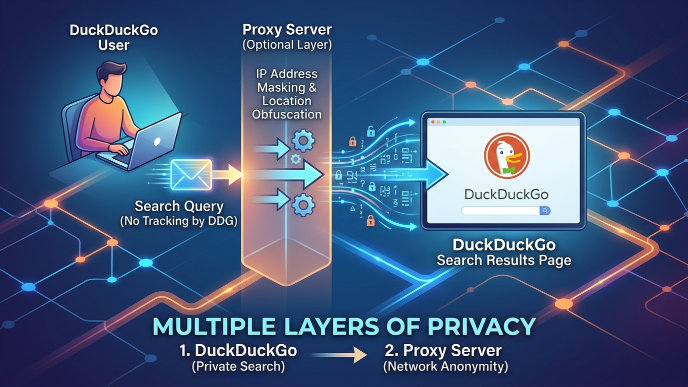
Yes. DuckDuckGo hides your search history, but it cannot hide your IP address or your location. A proxy server covers that gap by changing the address that websites see, so using both together gives you stronger privacy than either one alone.
That’s the short answer. Now let’s break down exactly why, how it works, and what you need to know before you set one up.
Why This Question Matters
Think about your home address. If you tell nobody your name but you still write your address on every letter you send, people can still figure out who you are.
That’s basically what happens when you search the internet.
DuckDuckGo does a great job of not writing your name on your search letters. It doesn’t save your search history, doesn’t build an advertising profile of you, and blocks a lot of trackers hiding on websites. That’s real, meaningful privacy.
But your IP address is still stamped on every request you send out. Websites can see it. Your internet provider can see it. And if someone really wanted to, they could use that IP address to figure out roughly where you live and sometimes even who you are. You can see exactly what a website learns about you by checking a tool like WhatIsMyIPAddress.
This is exactly where a proxy server steps in.
What Is DuckDuckGo, Really? (Quick Refresher)
DuckDuckGo is a search engine, like Google or Bing, except it’s built around one main promise: it will not track you.
Here’s what it actually does:
- It doesn’t save your search history tied to your identity
- It doesn’t build an ad profile based on what you search
- It strips tracking parameters out of links when possible
- Its browser, the DuckDuckGo Privacy Browser, blocks many trackers automatically
- It doesn’t show you different results based on a profile of “who you are”
This is genuinely useful. Most people never think about how much a normal search engine learns about them just from search history alone. DuckDuckGo removes that layer. For more background on how online tracking works generally, the Electronic Frontier Foundation publishes some of the most accessible research on the subject.
What DuckDuckGo Does NOT Protect
This is the part most articles gloss over, so let’s be blunt about it.
DuckDuckGo does not:
- Hide your IP address from the websites you visit
- Hide your DNS requests from your internet service provider (ISP)
- Encrypt your traffic with a VPN-style tunnel
- Stop your network administrator, school, or workplace from seeing which sites you visit
- Protect you if you’re logged into other accounts (like Google or Facebook) in the same browser
- Prevent browser fingerprinting in every case you can actually test your own fingerprint with EFF’s Cover Your Tracks tool
So if your goal is just “don’t build an ad profile of my searches,” DuckDuckGo alone is enough. If your goal is “don’t let anyone see my IP address or location,” you need something else in addition. That’s the gap a proxy fills.
What Is a Proxy Server? (Explained Simply)
Imagine you want to send a letter to a friend, but you don’t want your name on the envelope. So instead, you give the letter to a neighbor. The neighbor puts their own return address on it and mails it for you. Your friend gets the letter, but all they see is your neighbor’s address, not yours.
A proxy server is that neighbor. Cloudflare’s glossary on proxies is a solid technical primer if you want to go deeper on how request routing actually works under the hood.
When you use a proxy:
- Your device sends the request to the proxy server first
- The proxy server sends that request to the website on your behalf
- The website sees the proxy’s IP address, not yours
- The website sends the response back to the proxy
- The proxy sends it back to you
The website never directly sees your real IP address. It only sees the proxy’s. This kind of routing infrastructure shows up constantly in broader tech and tooling discussions see our related coverage in the Tech category on Inverex Tech for more on how modern web infrastructure works.
How DuckDuckGo and a Proxy Work Together
These two tools solve two different problems, and that’s exactly why combining them makes sense.
| What you’re worried about | Tool that handles it |
| Search history being tracked and sold | DuckDuckGo |
| Ad profiles built from your searches | DuckDuckGo |
| Trackers hidden in websites | DuckDuckGo |
| Your real IP address being visible | Proxy server |
| Your rough location being exposed | Proxy server |
| Your ISP seeing every site you visit (partially) | Proxy server (routes traffic away from direct ISP visibility for that connection) |
Neither tool replaces the other. DuckDuckGo protects what happens inside your search. A proxy protects where the request appears to come from. Stack them, and you close two separate privacy holes at once.
Types of Proxies: Which One Actually Fits Your Needs
Not all proxies are the same, and picking the wrong one is a common mistake. Here’s a simple breakdown.
HTTP/HTTPS Proxies These handle regular web browsing traffic. HTTPS proxies keep your connection encrypted between you and the site, which matters for anything involving passwords or personal data. Good for everyday browsing and searching.
SOCKS5 Proxies These are more flexible. They can carry any type of internet traffic, not just web browsing, which makes them useful for apps beyond just your browser. Slightly more technical to set up but more capable Wikipedia’s SOCKS entry covers the protocol history if you’re curious.
Residential Proxies These use real IP addresses assigned by internet providers to actual homes. They look like ordinary home internet connections, so they’re harder to detect and block. They tend to cost more.
Datacenter Proxies These use IP addresses from servers in data centers, not homes. They’re faster and cheaper, but some websites can detect and block them more easily because the IP clearly doesn’t belong to a home network.
Rotating Proxies These automatically switch your IP address either on a schedule or with every new request. Useful if you don’t want the same “fake identity” showing up over and over.
Simple rule of thumb: for everyday private browsing with DuckDuckGo, a reputable HTTPS or SOCKS5 proxy from a trustworthy provider is enough. You don’t need rotating residential proxies unless you have a specific, heavier use case like large-scale research or avoiding aggressive IP blocking. If you’re weighing tools for a broader research or lead-generation workflow, our guide to email finder tools for lead generation covers a related set of trade-offs.
Proxy vs VPN vs Tor: What’s the Real Difference?
This is one of the most searched follow-up questions, and most competitor articles skip it entirely. Let’s fix that.
| Feature | Proxy | VPN | Tor Browser |
| Hides your IP from websites | Yes | Yes | Yes |
| Encrypts all your device’s traffic | Usually no (only app-specific) | Yes, all traffic | Yes |
| Speed | Fast | Medium | Slow |
| Hides traffic from your ISP | Partially | Yes | Yes |
| Free options available | Yes, but risky | Some, limited | Yes, free |
| Best for | Quick IP masking for browsing/search | All-around privacy across your whole device | Maximum anonymity, slower use cases |
In plain terms: a proxy is like changing the return address on one envelope. A VPN is like putting your entire house inside a locked, unmarked truck before it goes anywhere. Tor is like passing that truck through three different unmarked trucks driven by strangers before it reaches its destination. The Tor Project’s own site explains this “onion routing” concept in more technical detail if you want the full picture.
If you only care about DuckDuckGo searches specifically, a proxy is a lightweight, fast option. If you want your whole device protected, a VPN is the stronger choice. If you need the highest level of anonymity and speed isn’t a priority, Tor is the strongest option of the three.
Step-by-Step: Setting Up a Proxy With DuckDuckGo
Here’s a clear, beginner-friendly walkthrough.
Step 1: Choose a trustworthy proxy provider Avoid random free proxy lists. Free proxies frequently log your data or inject ads. Pick a provider with a clear no-log policy and paid plans, since free services need to make money somehow, and that “somehow” is often your data.
Step 2: Pick the right proxy type For browser-based searching, an HTTPS or SOCKS5 proxy works well.
Step 3: Get your proxy details Your provider will give you:
- A proxy server address (IP or hostname)
- A port number
- A username and password (if required)
Step 4: Configure it in your browser
- In Firefox: go to Settings > General > Network Settings > Manual proxy configuration, then enter your details (Mozilla’s official support guide walks through this step by step)
- In Chrome: proxy settings are managed through your operating system’s network settings
- On Windows: Settings > Network & Internet > Proxy
- On Mac: System Settings > Network > Wi-Fi > Details > Proxies
Step 5: Open DuckDuckGo and test it Go to duckduckgo.com and run a search like normal.
Step 6: Confirm it’s actually working
- Search “what is my IP address” and confirm it shows the proxy’s IP, not yours
- Run a DNS leak test to make sure your DNS requests aren’t leaking through your regular ISP
- Clear cookies and cached data from before you set up the proxy, since old cookies can still identify you even with a new IP
Common Mistakes People Make (Gap Competitors Miss)
- Using a free public proxy for anything sensitive. Free proxies are a common source of data leaks. If you’re not paying for the service, assume your traffic might be logged or sold.
- Forgetting to clear cookies first. A new IP address doesn’t erase old login cookies. Websites can still recognize you through stored cookies even if your IP has changed.
- Assuming a proxy encrypts everything. Most proxies only route your browser traffic, not your entire device. Apps outside the browser may still use your real IP.
- Not testing for DNS leaks. Some proxy setups still send DNS requests through your regular ISP, which quietly defeats the purpose.
- Mixing proxy use with logged-in accounts. If you’re logged into Gmail or Facebook in the same browser session, that account can still link activity back to you.
- Using the same proxy IP for everything, forever. This can create a new trackable pattern over time, similar to the very tracking you were trying to avoid.
Real-World Example
Say someone wants to research prices for flights but doesn’t want airline websites to see repeat visits from their home IP and raise prices based on demand tracking (a known and documented pricing tactic). By combining DuckDuckGo with a rotating proxy, each search session can appear to come from a different location, giving them a cleaner, untracked view of pricing.
Another example: a journalist researching a sensitive topic wants to make sure their searches can’t be tied back to their home network. DuckDuckGo keeps the search itself untracked, and a proxy keeps their IP address out of any server logs on the sites they visit. This kind of workflow-level thinking about tools overlaps with topics we cover in our AI chatbot tools roundup, where choosing the right tool for the right job matters just as much.
Risks and Downsides You Should Know
Proxies aren’t magic, and they come with trade-offs.
- Trust risk: A shady proxy provider can see and log everything passing through it, including your unencrypted traffic. You’re trusting the proxy operator instead of your ISP.
- Man-in-the-middle risk: Poorly secured or malicious proxies can intercept or alter data, including injecting unwanted ads.
- Speed drop: Routing traffic through another server adds distance and delay, so pages may load slower.
- CAPTCHAs and blocks: Some websites flag proxy traffic and throw up extra verification steps or block it outright.
- False sense of full anonymity: A proxy alone doesn’t encrypt everything on your device. People sometimes assume they’re fully anonymous when they’re only partially covered.
Is It Legal to Use a Proxy With DuckDuckGo?
Yes, using a proxy server is legal in the vast majority of countries. Proxies are widely used by businesses, researchers, and everyday users for legitimate privacy and access reasons. A small number of countries do restrict or heavily monitor proxy and VPN use, so it’s worth checking local rules if you’re in a highly restrictive region. Legality shifts if the proxy is used to break laws, such as accessing accounts you don’t own or committing fraud — the tool itself isn’t illegal, but misuse of it can be.
Actionable Tips for Better Anonymity
- Pick a paid proxy provider with a clear, published no-log policy
- Use HTTPS or SOCKS5 proxies over plain HTTP for anything involving personal data
- Pair your proxy with DuckDuckGo’s built-in tracker blocking for layered protection
- Clear cookies and site data before and after sensitive searches
- Run a DNS leak test after setup, not just an IP check
- Avoid logging into personal accounts while using a proxy for anonymous research
- Rotate IPs occasionally if you’re doing repeated, sensitive searches
- Consider a VPN instead if you want your entire device covered, not just your browser
If you’re generally interested in how privacy-first and productivity tooling choices intersect from browsers to email workflows our email management tools guide is a useful next read, and our homepage rounds up our latest coverage across tech, tools, and privacy.
FAQs
Does DuckDuckGo hide my IP address?
No. DuckDuckGo protects your search history and blocks trackers, but the websites you visit can still see your real IP address unless you use a proxy or VPN alongside it.
Is a proxy the same as a VPN?
No. A proxy typically reroutes traffic from a specific app or browser and usually doesn’t encrypt your whole device’s traffic. A VPN encrypts and reroutes everything on your device.
Can I use a free proxy safely with DuckDuckGo?
It’s risky. Free proxies often log your activity, inject ads, or sell your data to stay profitable. A paid, reputable provider with a no-log policy is much safer.
Will using a proxy slow down my searches?
Slightly, yes. Since your traffic travels through an extra server, there’s a small delay, though it’s usually barely noticeable with a good provider.
Do I still need DuckDuckGo if I’m already using a proxy?
Yes. A proxy hides your IP address, but it doesn’t stop tracking scripts or ad profiling on the sites you visit. DuckDuckGo handles that part.
What’s better for anonymity: proxy, VPN, or Tor?
It depends on your goal. A proxy is fast and good for basic IP masking. A VPN covers your entire device with encryption. Tor offers the strongest anonymity but is the slowest.
Can websites detect that I’m using a proxy?
Sometimes. Datacenter proxies are easier to detect than residential proxies, which look like normal home connections.
The Bottom Line
DuckDuckGo and proxy servers solve two different pieces of the same puzzle. DuckDuckGo keeps your search history private and blocks trackers. A proxy hides your IP address and location from the sites you visit. Used together, they cover far more ground than either one alone, giving you a genuinely stronger, more private browsing experience without needing anything overly technical or expensive.
